Editing content
Navigation
Build and arrange the site's menus — links to pages, typed URLs, nesting, and menus built from files.
A navigation is a menu: the links across the top of Tidewater’s site, the footer, a sidebar. Which menus exist is part of the site’s setup; what is in them is yours.
After reading this guide, you will know:
- How to add, arrange and nest links.
- When to link to a page and when to type a URL.
- When a menu change reaches the site.
- Why some menus cannot be edited here.
1. Editing a menu
Open Navigation in the sidebar and choose a menu. Tidewater’s main menu has four links:
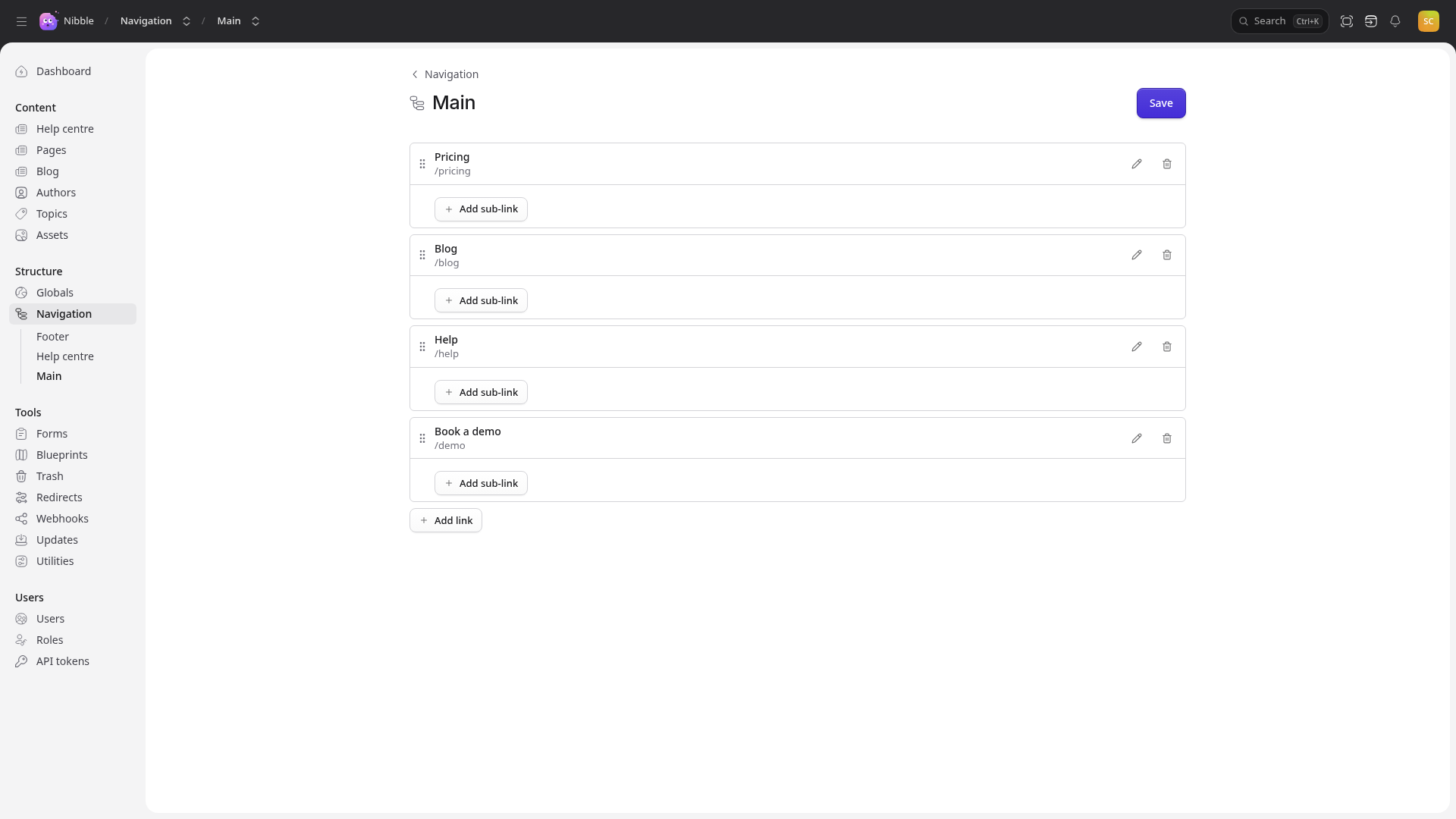
- Add link adds one at the bottom; Add sub-link adds one beneath another.
- Drag a link by its handle to move it. Drag it under another to nest it — as deep as the menu allows.
- The pencil edits a link; the bin removes it.
- Save puts the menu on the site. There is no separate publish step for menus.
2. Two kinds of link
- A link to an entry. Choose the page from a picker.
- A link to a URL you type — for anything outside the site, or an address that is not an entry, such as
Tidewater’s
/bloglisting.
Tip
Link to an entry whenever you can. If the page’s slug changes, or it moves under another page, the menu is still right. A typed URL is a URL you have to remember to fix.
A link can have a title of its own. Left empty, a link to an entry shows the entry’s title on the site — the editor shows its address instead.
3. Where it appears
A menu appears wherever the theme draws it. If one exists but does not appear anywhere, the theme is not drawing it yet — a question for whoever builds the site rather than something to fix here.
4. Menus built from files
Some menus are built from a folder of files rather than arranged here — Tidewater’s Help centre sidebar follows the help articles’ folders, so adding an article adds it to the menu.
Warning
Such a menu still appears in the list, and opens as an empty menu with Add link and Save. Anything you add there is ignored: the site always builds that menu from the files. Ask whoever writes them.