Nibble 0.19.2: AI apps and agents, built in
AI apps connect to a Nibble site over MCP and work as the person who connected them, within limits checked on every request. Plus the nibble command, the management API, and developer tools for agents.
Mahfuz Shaikh6 min read
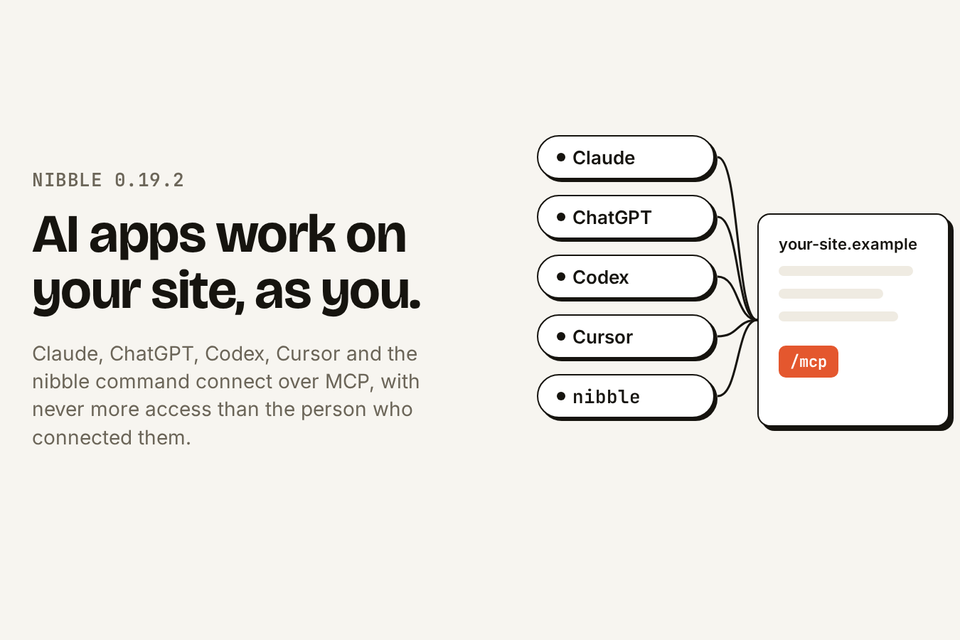
Nibble 0.19.2 is out. It completes the work that began in 0.19.0: AI apps can now work on a Nibble site the way a person does — as the person who connected them, and only within the limits that person and the site allow. Claude, ChatGPT, Codex, Cursor and any other client that speaks the Model Context Protocol connect at one address on the site. The new nibble command does the same from a terminal. And for the developers building a site, Nibble ships tools that give an agent the same feedback a person gets.
This post walks through each part: how an app connects, what it may do, how live changes are approved, the management API underneath, the command-line tool, and the tools for building a site with an agent. It closes with what else changed in 0.19.1 and 0.19.2, and how to upgrade.
Connecting an app
Every Nibble site now answers MCP at /mcp. A person opens Connected apps from their account menu, copies that address, and adds it to their app: as a custom connector in Claude or ChatGPT, with one command in Claude Code, as a line in Codex's configuration, or in Cursor's MCP settings. nibble mcp install does it for Claude Code, Codex and Cursor.
The app then sends them to the site to sign in, with their password, a two-factor code or a passkey. The app never sees any of them. Once signed in, they choose what it may do.
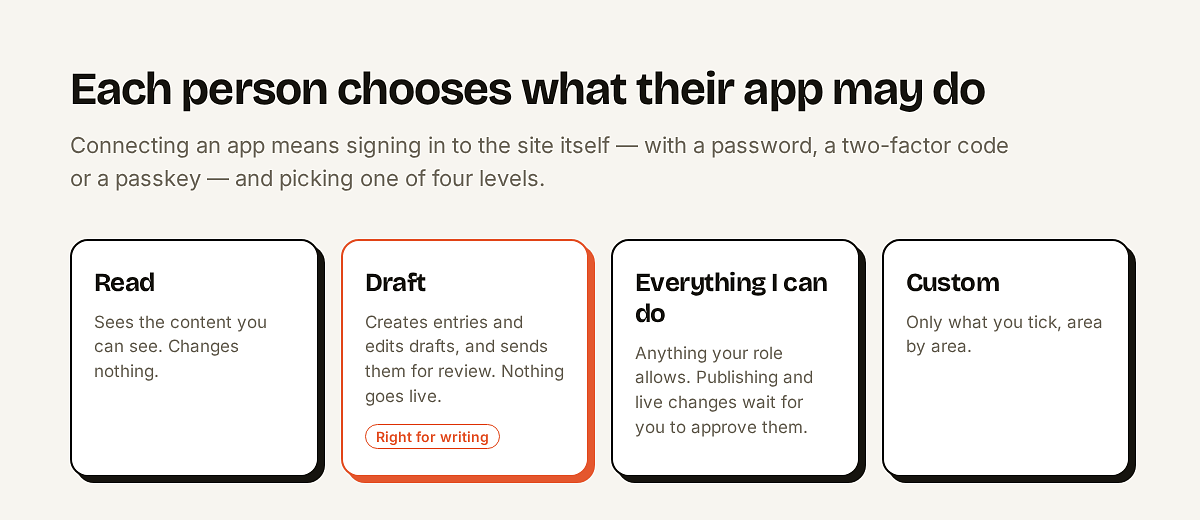
Draft is the recommended choice for writing. The app drafts, the person reads the result in the Control Plane, and the person publishes.
Three limits, checked on every request
What a connected app can do is the smallest of three things, and all three are checked on every request, not only when it connects:
The person's roles. An app connected by an Author can never publish, because the Author can't.
What the person chose when connecting it: read only, drafts only, everything they can do, or area by area.
What the site allows on its Agent access page.
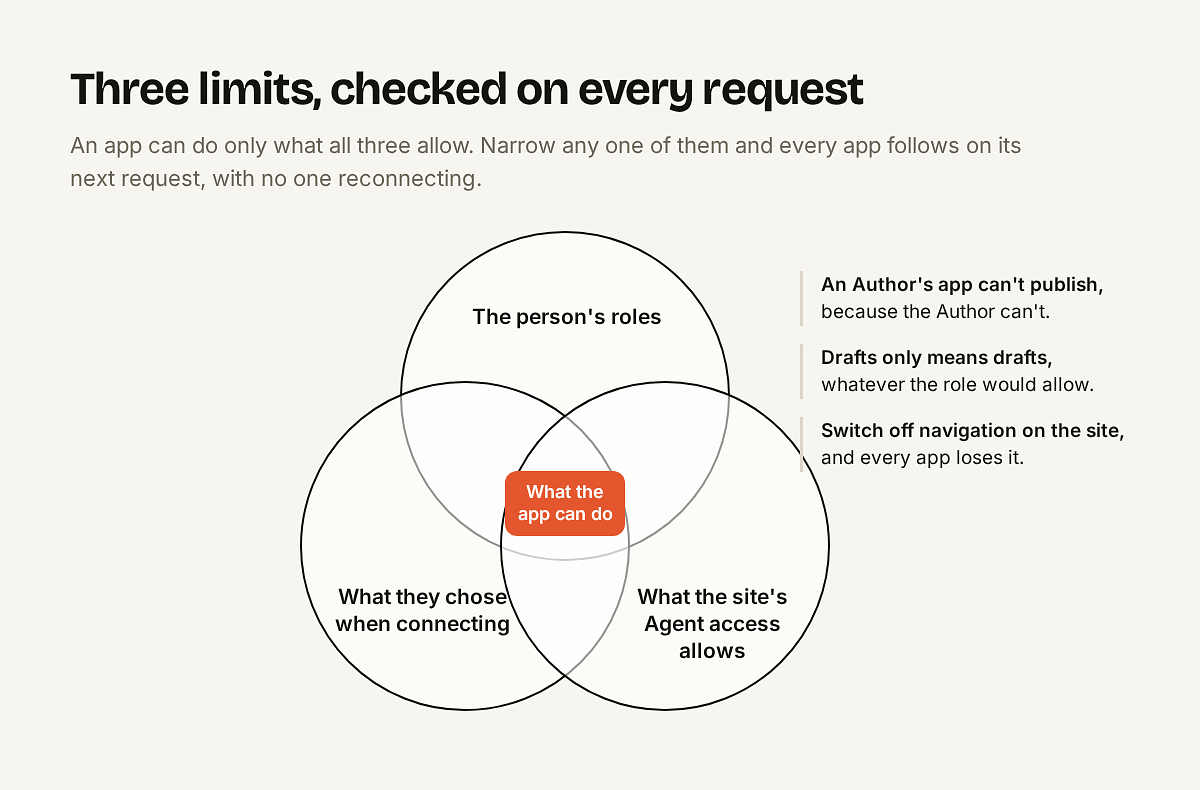
Because the check is live, narrowing any one of them takes effect at once. Removing someone's role or account ends their apps' access immediately, and switching an area off on the Agent access page removes it from every app on its next request, with no one reconnecting.
Live changes wait for a person
Some changes don't pass through a draft, or can't be quietly undone: publishing, unpublishing or trashing an entry, and any change to terms, globals, navigation or files. When an app given Everything I can do asks for one, Nibble first checks it would succeed, then holds it and tells the app to ask its person.
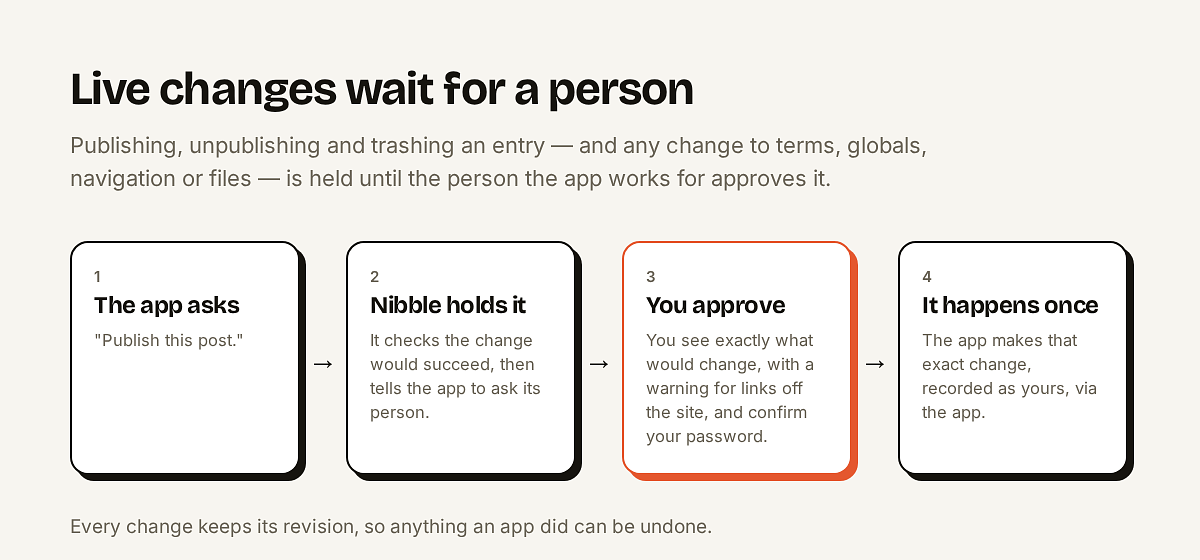
The person gets a notification and sees exactly what would change, with a warning when the change links to another site. They confirm their password and approve, and the app makes that exact change, once. Every change is recorded as the person's, via the app, in revisions and the audit log, so it can be reviewed and restored like any other edit.
Agent access, for administrators
Agent access is off until an administrator turns it on under Users → Agent access. The page lists every area of the site, each collection and taxonomy, globals, navigation, assets and form submissions, with switches for Read, Write, Publish and Delete. It starts narrow: apps may read content and write entry drafts, and nothing more.
Connecting apps is a permission, Connect apps, given role by role.
Signing in with a code, for an app on a server with no browser, is a separate switch and off by default. An app signed in that way can never be given everything its person can do.
The page lists every connected app on the site beside its settings: whose it is, what it may do, when and from where it was last used, when it expires, and a button to disconnect it.
A sign-in lasts at most 90 days, and ends after 30 days unused. Each person is notified when an app is connected to their account.
Some things are never available to apps: users, roles, tokens, webhooks, redirects and settings. An app can move content to the trash, but only a person can empty it.
The management API
Apps work through the management API at /api/v1/operations, and the MCP server is generated from the same operations, so the two never drift apart. Each operation describes its arguments as JSON Schema, and the API offers:
A dry run, which reports what a change would do without making it.
Safe retries, so a request repeated after a timeout doesn't repeat the change.
`lock_version`, so nobody's edit is silently overwritten.
Rich text as Markdown.
Errors that say what to do next, rather than only what went wrong.
Every answer carries the API's contract number, Nibble::MANAGEMENT_API_VERSION, so a client can tell whether it or the site needs upgrading. For scripts with no browser, such as a nightly import or a CI job, a person can create a token under Connected apps. It acts as them, with the access they choose, for up to 90 days.
The nibble command
The nibble command-line tool is released on its own, from mah3uz/nibble-cli. It starts new sites and runs a site's tasks, and it works on the content of any number of sites and accounts, from a terminal or from an agent.
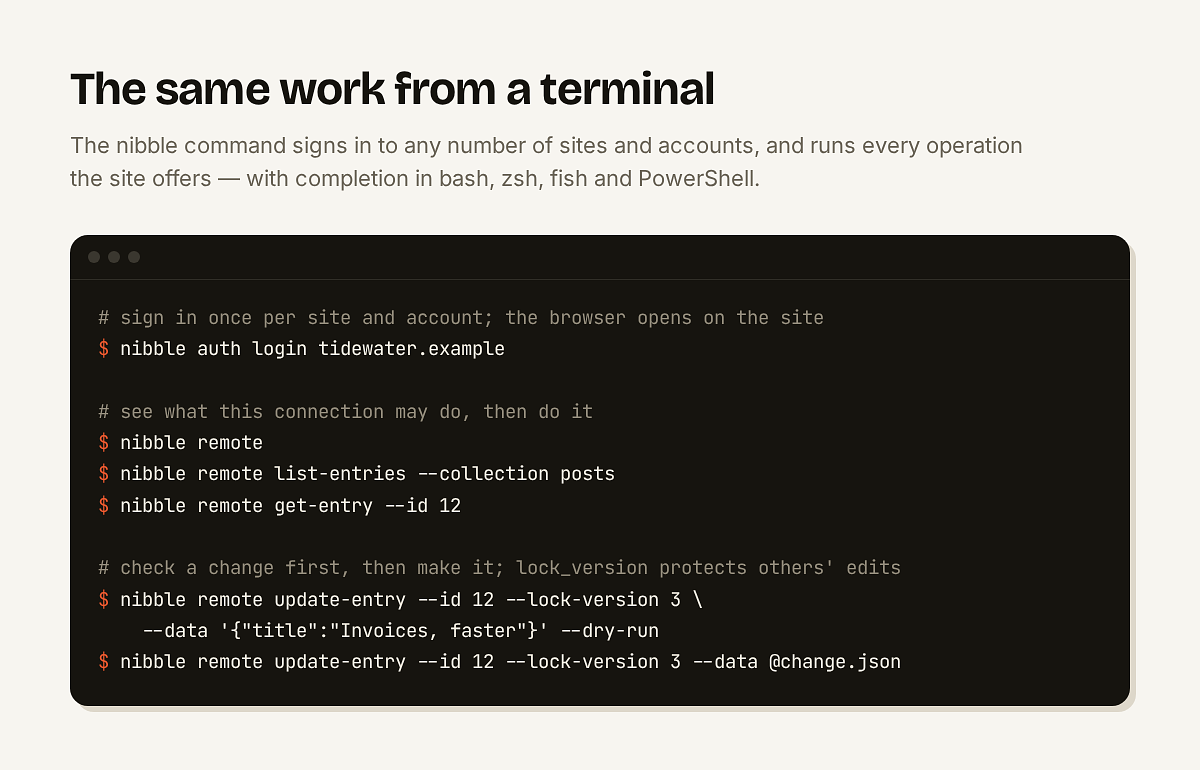
nibble remote lists what the current connection may do, and completion in bash, zsh, fish and PowerShell offers the site's own collections and values as you type. Install it with:
curl -LsSf https://github.com/mah3uz/nibble-cli/releases/latest/download/nibble-cli-installer.sh | shA guide written for agents
An app working on a site needs to know the site, not only the API. Nibble writes a guide from the site's schema and from the team's own notes in site/agents/*.md, such as house style or what not to touch, and serves it over MCP as a skill, through MCP's Skills extension. It can also be installed as a skill directly.
Tools for the agent building your site
Everything above is about content. Building a site, whether a theme, a blueprint or some Ruby, is a developer's work, and more of it now happens with an agent. bin/rails nibble:dev:mcp gives that agent the same feedback a developer gets, as data. It runs in development only, over standard input and output, with nothing listening on the network.
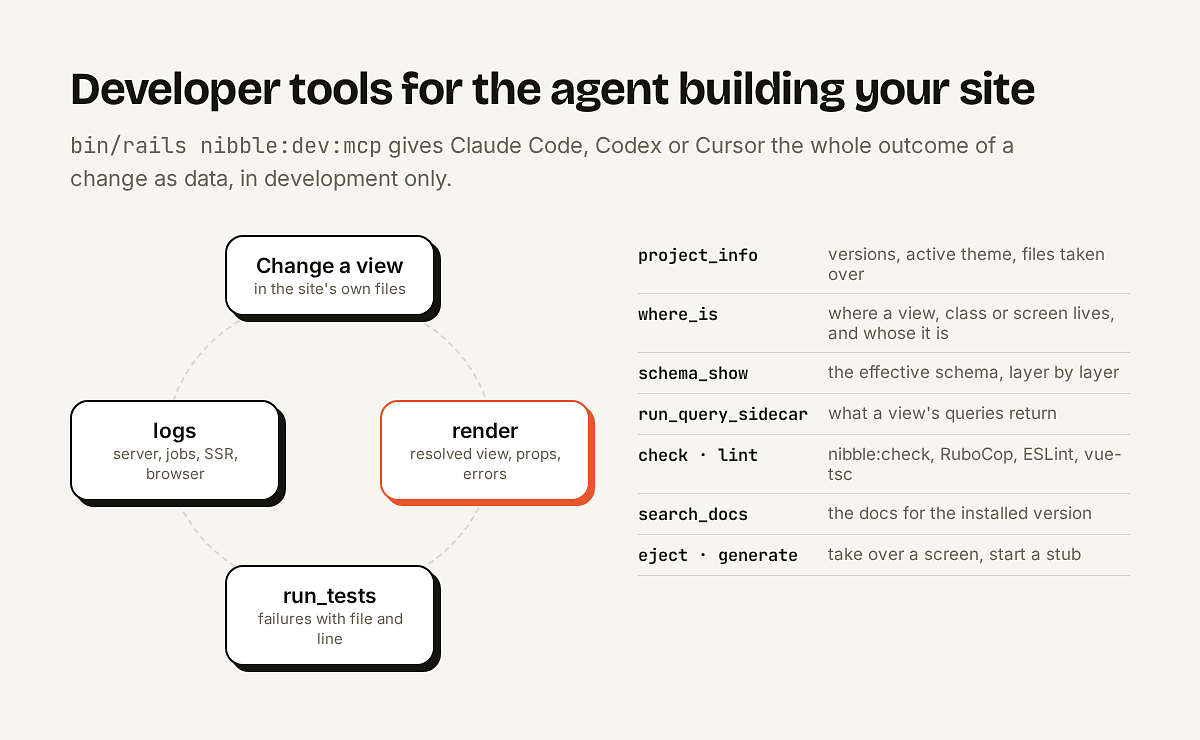
bin/rails nibble:dev:setup connects Claude Code and Cursor (Codex takes one command), and links the three skills Nibble ships, nibble-theming, nibble-schema and nibble-extending, which arrive with each upgrade. It also keeps the agent out of vendor/nibble/: an agent that edits Nibble's own files makes a site impossible to upgrade, so check and nibble:check report any Nibble file changed in place. New sites get an AGENTS.md for the team's own conventions, which every agent reads.
Also in 0.19.1 and 0.19.2
Analytics as cards. Paste the snippet each tool gives you, from Plausible, Fathom, Umami, Cloudflare Web Analytics, Google Analytics 4 or Google Tag Manager, and Nibble places it where the tool says. Custom code is named snippets in the head, or at the start or end of the body.
The Integrations global asks for your password again, as users, roles and API tokens do, because what it holds runs on every live page.
A code field for HTML, with line numbers and highlighting.
Clearing a field stores nothing, and a field's default applies only to something new.
Sign-in explains a failed attempt on the form, without saying whether the account exists, and every password field can be shown.
Adding a passkey no longer fails in the browser, and the notifications menu is redesigned.
The nightly backup keeps its copy on the server when no S3 bucket is set.
Upgrading
Upgrade with bin/rails nibble:upgrade. Two of these releases carry an Upgrade note: 0.19.1 replaces the Integrations global's analytics and custom-code fields, and 0.19.2 changes analytics cards to take each tool's snippet. Each note gives one command to run before deploying. Agent access stays off until an administrator turns it on, so nothing changes for a site until someone decides it should.
Turn on agent access
What apps may do, who may connect them, and how approvals work, in full.
Agent access