Nibble 0.20.0: work that runs on its own
Scheduled tasks keep a site's figures and feeds up to date on their own, carefully. Plus content packages that carry their files, finer control over titles and the sitemap, a Control Plane that pages everything, and Back that closes the dialog instead of the page.
Mahfuz Shaikh11 min read

Nibble 0.20.0 is out. Most of what a site does happens because someone did something: an editor saved a page, a visitor sent a form, a person asked an app to draft a post. This release adds the other kind: work that happens on its own, on a schedule, with nobody at the keyboard. A site can now keep its figures in step with an API, keep a collection in step with a feed, and call out to other systems at the hours you choose, and it does so as carefully as an editor would.
That's the headline. Around it, a content package can now carry its own images and files, editors get finer control over titles and the sitemap, several Control Plane screens that stopped after their first screenful now show everything, a page at a time, and the browser's Back button finally does what people expect in a dialog. There are also a handful of fixes, one security change you should read before deploying, and three short upgrade notes.
Scheduled tasks
A scheduled task is one YAML file in site/schema/tasks/. Like everything else in a site's schema, it's declared rather than programmed, it lives in the repository beside the blueprints it feeds, and nibble:check reads it before it ever runs. Here is a task that keeps two figures on a home page up to date:
# site/schema/tasks/stats.yml
title: Home page figures
schedule: every 2 hours
fetch:
  use: tidewater
  path: /stats
  into:
    global: stats
    map:
      teams: "{response.data.teams}"
      shipments: "{response.data.shipments_this_month}"
use: tidewater names an API connection the site already has, the same kind its forms deliver to, so the address, the headers and the secrets are written once. into.map says which field of the stats global takes which part of the answer. Every two hours the figures move to whatever the API says, and the global's history shows each change.
A schedule reads the way you would say it: every hour, at 5am every day, every monday at 9am. A cron line works too, with a time zone of its own if it needs one. Otherwise schedules follow the site's time zone, so "5am" means five in the morning where the site is, not in UTC.
There is nothing else to set up. Tasks run on the job that already publishes scheduled entries, so production needs no config/recurring.yml entry, no cron on the server and no new process.
Built to fail quietly and recover on its own
A job on a timer can easily go wrong without anyone noticing. Tasks are built around the ways that happens:
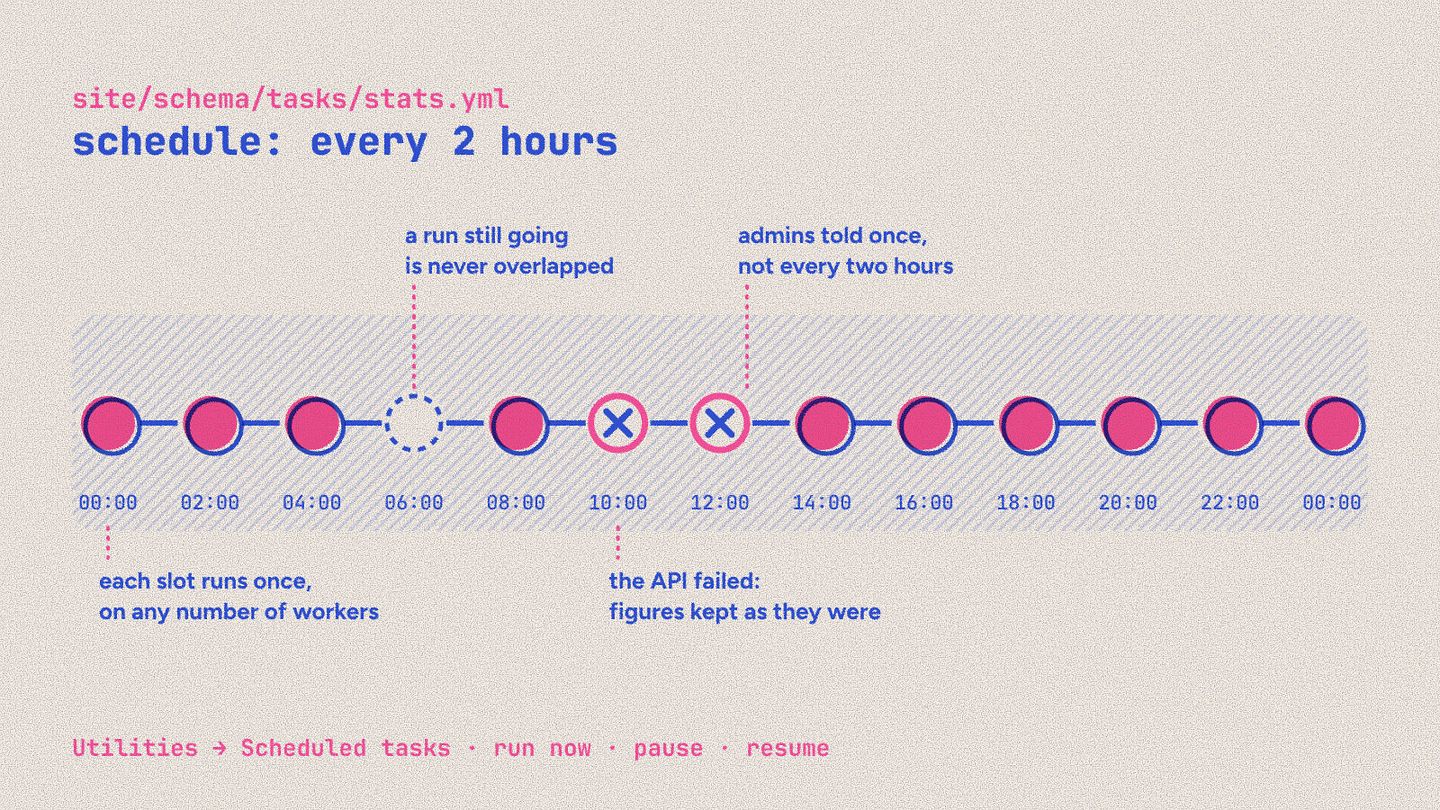
A slot runs once, however many job workers the site has.
A run still going is never overlapped. The next slot is recorded as skipped. A run that hasn't finished after an hour is taken to have died with its worker, so the task doesn't stall for good.
A failure keeps what you had. When the API answers with an error, takes too long, isn't allowed or sends something that isn't JSON, the run fails and the global keeps the figures it had. A path the answer doesn't have leaves just that field alone, and the run says which.
Missed slots aren't made up. After a few hours of downtime, a task runs once, for the latest slot, not once for every slot it missed.
Administrators are told once. When a task that was working starts failing, they get a notification saying why. They aren't told again every two hours, only after it has recovered and failed again.
Nothing is saved when nothing changed, so a global's revisions show only real changes, not a row every two hours.
Every call goes through the same outbound checks as the rest of Nibble: only allowed hosts, never a private address, each request logged. Secrets go into headers as {secret.name}, and an answer is only ever read for {response.…}, so a remote system can't send back text that pulls one of your secrets into the site.
Utilities → Scheduled tasks in the Control Plane lists every task with its schedule, its next run and its recent runs, each with when it was due, when it started and finished, and how it went. From there you can run a task now, pause it or resume it. Run now also works in development, where nothing runs on a schedule.
Keeping a collection in step with a feed
A task can also write entries. Point it at a list in an API's answer, say which field identifies an item from one run to the next, and map the rest:
# site/schema/tasks/jobs.yml
title: Open roles
schedule: every hour
fetch:
  url: https://hiring.example/api/jobs?status=open
  into:
    collection: jobs
    items: "{response.jobs}"
    key: ref
    unpublish_missing: true
    map:
      title: "{item.title}"
      ref: "{item.id}"
      location: "{item.location.city}"
The first time a job appears, it becomes a published entry. Later runs update it, and leave it alone when nothing changed, so the same feed run twice changes nothing the second time. With unpublish_missing, a job the feed stops listing is unpublished, and published again if it returns.
Importing into a collection that people also edit could easily go wrong, so a feed import follows four rules:
A task only changes entries it created. It remembers each one by its key. An entry someone wrote in the Control Plane is never updated or unpublished by a task, even when its key matches an item in the feed.
An entry with unpublished edits is left alone. If an editor has a draft open on an imported job, the task skips that entry until they publish or discard the draft, so a feed refreshing never puts someone's unfinished work live. The run counts it as skipped and says why.
An empty list unpublishes nothing. A feed that suddenly lists no jobs is far likelier to be a fault at the other end than every role filled at once.
What a person unpublished stays unpublished. A task republishes only what it unpublished itself.
A collection that uses the review workflow can't be imported into, because nothing would approve what the task publishes. nibble:check says so before the first run, not after.
When YAML isn't enough
Some jobs need code. A task can name a handler instead, registered in Ruby:
# config/initializers/tasks.rb
Nibble::Tasks.register_handler("carrier_count", lambda do |task|
  carriers = task.connection(:tidewater).get("/carriers").json.fetch("carriers")
  task.update_global(:stats, { carriers: carriers.count { |carrier| carrier["active"] } })
  { carriers: carriers.size }
end)
The handler gets the task's context. task.connection calls an API connection through the same outbound checks as everything else, and task.update_global changes a global. Those two are the supported way for site code to change a global or call an API connection. A hash the handler returns is kept with the run, an error it raises fails the run with its message, and nibble:check refuses a task whose handler isn't registered.
A fourth kind of task, request, simply calls a URL on a schedule and succeeds on any 2xx. It's useful for warming a cache, pinging a status page or nudging another system awake at five every morning.
Content packages carry their files
A content package is a folder of YAML that nibble:content:import turns into entries, terms, globals and navigation. It's how a site starts with content, how content moves between environments, and how a theme's demo becomes a real site. Until now a package could describe its images but not include them: each one had to be on the site already.
Now a package can bring them. Beside assets.yml, an assets/ folder holds each file at the path its row names. An import uploads the files the site doesn't have yet before it creates anything that refers to them, and applies the row's title, alt text, focal point and tags to each upload. Running it again uploads nothing, because the files are already there. The Control Plane's import does the same with a zip.
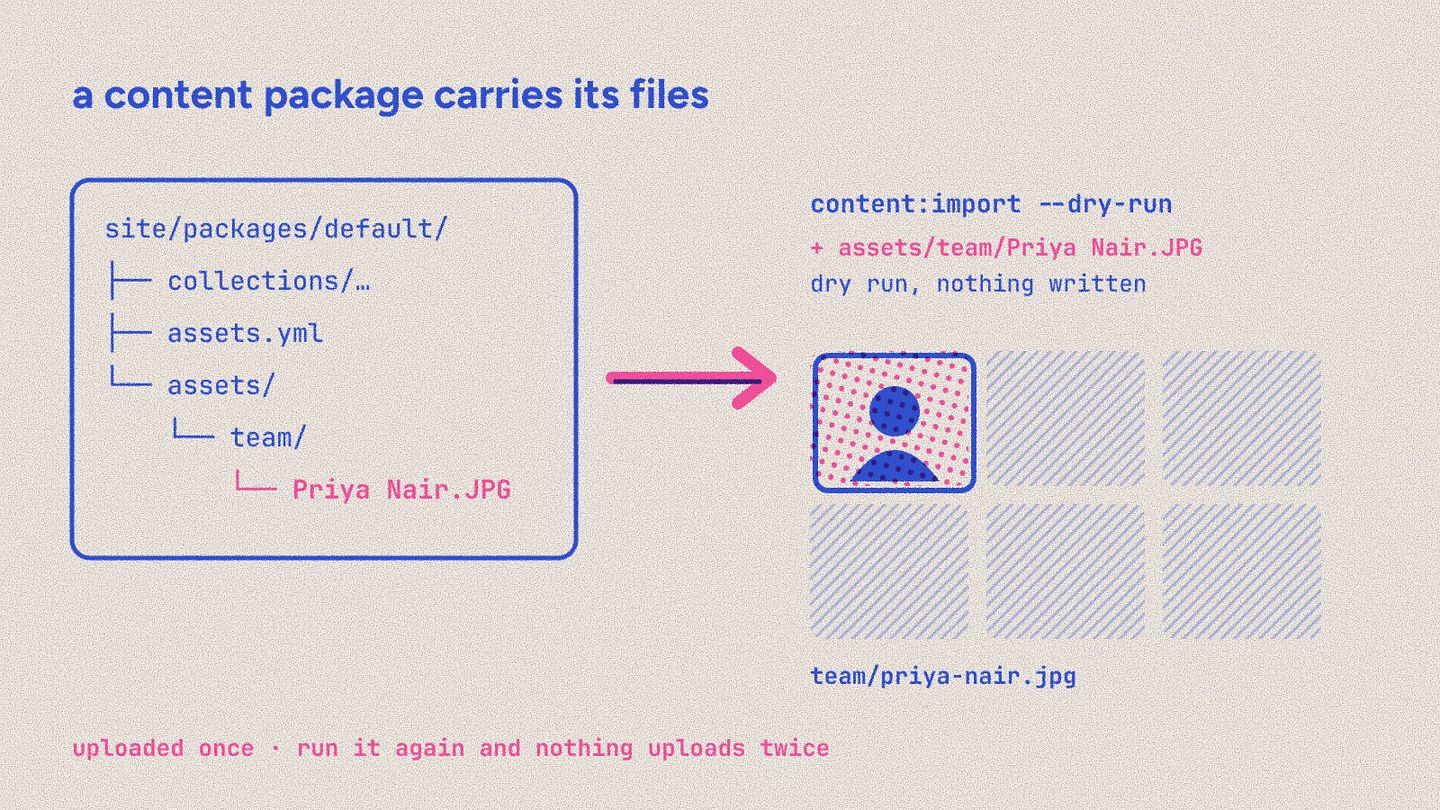
Two related improvements came with it. nibble:content:import --dry-run now lists what it would create and update, one line each, uploads included, instead of only saying the package is valid. And a package's references match an asset's stored filename as well as the one written, so Team Photo (1).JPG in a package finds the team-photo-1.jpg the upload made.
Titles, sitemaps and share images
The SEO field on every entry gains two switches.
Use this title as written sends the page's
<title>andog:titleexactly as the editor typed them, without the site's title template. A home page titled with the site's name no longer gets the name twice.Leave out of the sitemap keeps an entry out of
sitemap.xmlwhile it stays indexable. That isn't the same as Hide from search engines: a thank-you page or an old campaign can stay reachable and indexable without being advertised.
A collection's sitemap now also lists its index page, dated by its newest published entry, so /blog is in the sitemap and search engines can see when it last changed.
The share image is now picked from the media library and sized by the og preset, instead of typed in as a URL, so it's served and cropped like every other image on the site.
Editors choose how many
A block's query can now take its limit from the block itself. A "Latest posts" set can offer an editor a number field and use it:
# site/themes/tidewater/views/sets/latest_posts.yml
posts:
  from: entries:posts
  sort: published_at:desc
  limit: $set.count
paginate.per_page works the same way. A blank field falls back to the query's default, and any number is held between 1 and 100, so an editor can't ask a page for ten thousand posts.
The Control Plane, a page at a time
Several screens showed their first screenful and stopped. That's fine until the thing you're looking for is just past it. Each now pages properly:
Redirects are listed like Users: a page at a time, searchable by From and To, sortable by hits or last hit, and deleted in bulk. Each shows who added it (a person, Nibble itself when a URI changed, or an import) and when it was last used. Adding or editing one opens a dialog that keeps what you typed when a field is rejected, explains what From and To accept, names each status ("Permanent (301)") and suggests pages for To as you type.
The Trash shows a page at a time, one kind at a time: entries, terms or assets. Something deleted beyond the first screen can still be found and restored.
Missing pages, the log of paths visitors asked for that don't exist, is paged and searchable by path, instead of showing only the hundred most visited.
The notification bell loads older notifications with Load more.
Sorting Users by a column, descending, works. It always sorted ascending before.
Back closes the dialog, not the page
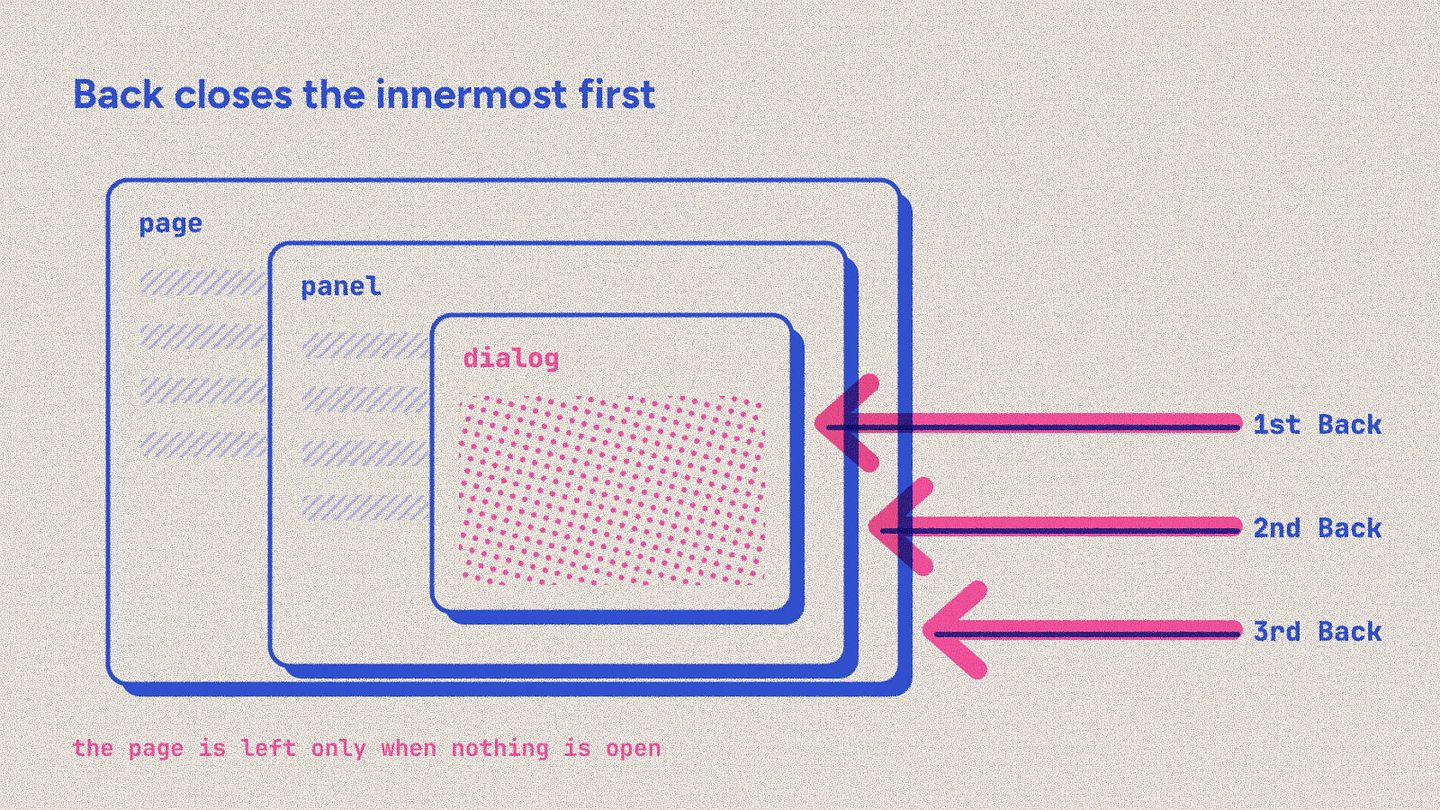
Press the browser's Back button with a dialog open, and you used to leave the whole page, with the dialog and whatever you were doing in it. Now Back closes the open dialog or panel, the innermost first, and only leaves the page when nothing is open. A dialog closed some other way, with its close button or Escape, leaves no extra step in the browser's history, so the next Back does what you'd expect.
For the people building sites
outbound.allow_private_networkslets a site call a CRM or API on your own machine or a private network while you develop. It takes effect in development and test only; production ignores it, andnibble:checkreports it as an error if it's set there.An API connection's
base_urlcan use{config.x}and{secret.x}, so development, staging and production can call different addresses without editing the schema:base_url: "{config.crm_url}/v1". The rendered address is still checked againstoutbound.allowed_hosts.The generated types have a union per collection and taxonomy, such as
PagesEntryandTopicsTerm, for a view that renders whichever blueprint it's given.Development serves no cached pages unless
bin/rails dev:cacheis on, so an edited view shows on the next request, and a change saved from a runner or a job shows up without clearing anything.A block's view no longer receives the block's
idandtype, so a row's id no longer lands as an HTMLidon the view's root element.A site's type check covers its own code, not the bundled themes, so
vue-tscpasses on a site that doesn't use them. See the upgrade note below.
Fixed
Adding a passkey no longer says it failed when it worked. The dialog reported "Unexpected end of JSON input" after the passkey had been saved. If you added one and were told it failed, check your account's passkeys: it's probably there.
nibble:content:import --dry-runlists what it would change instead of only saying the package is valid.Asset references in a package match the stored filename as well as the one written.
Security: CAPTCHA forms without keys
A form with captcha: true is supposed to refuse submissions until CAPTCHA keys are set. It didn't: with no keys, it accepted every submission, with no CAPTCHA checked at all. In 0.20.0 such a form refuses submissions, the visitor is told it can't take submissions right now, and nibble:check warns about each form in this state.
If any of your forms use a CAPTCHA, make sure its keys are under Globals → Integrations before you deploy, or those forms will stop accepting submissions.
Upgrading
Upgrade with bin/rails nibble:upgrade, which checks the release, takes a database snapshot, swaps it in and runs the migrations. Three things need you:
CAPTCHA keys. If a form uses a CAPTCHA, check its keys are set under Globals → Integrations before you deploy, as above.
Share images move to the media library.
bin/rails db:migrateturns a share image that points at one of the site's own assets into that asset, and removes any other, printing each one so you can pick it again. This migration can't be undone; the snapshotnibble:upgradetakes is the way back.tsconfig.app.jsonis your site's. Remove the twovendor/nibble/themes/*lines from itsinclude, so the type check covers only your code.
Scheduled tasks need nothing: a site with no site/schema/tasks/ folder has no tasks, and adding one is all it takes. The full list of changes is in the 0.20.0 changelog.
Write your first task
Schedules, feeds, handlers, and what happens when a run fails, overlaps or is missed, in one guide.
Scheduled tasks